Screen the search results first
Realvory Index chips appear alongside Property Finder listings so you can spot stronger candidates before opening every property in a new tab. It is a quick triage layer for deciding what deserves a closer look.
Add Realvory Index scores, pricing context, yield estimates, and deeper UAE property signals to the portal workflow you already use—without breaking your flow.
Why it helps
Built for investors, buyers, and client-facing property teams, the extension turns a familiar portal workflow into a faster first-pass screen. Your Realvory account controls access, while the browser companion keeps the analysis close to the listing that prompted it. Realvory is an independent service and is not affiliated with, endorsed by, or sponsored by Property Finder.
What appears in your browser
Informational tools to support screening and due diligence. Not financial, investment, or real estate advice.
From portal browsing to informed screening
Realvory Index chips appear alongside Property Finder listings so you can spot stronger candidates before opening every property in a new tab. It is a quick triage layer for deciding what deserves a closer look.
On a listing page, the Realvory score panel keeps core investment metrics next to the property itself. Free accounts get the summary view, while Professional and agency plans add the full score breakdown, investment details, and available market context.
When a property passes the first screen, jump into Realvory for deeper analysis, comparison, and shortlist workflows. You keep the speed of portal browsing without leaving the real evaluation trapped in browser tabs.
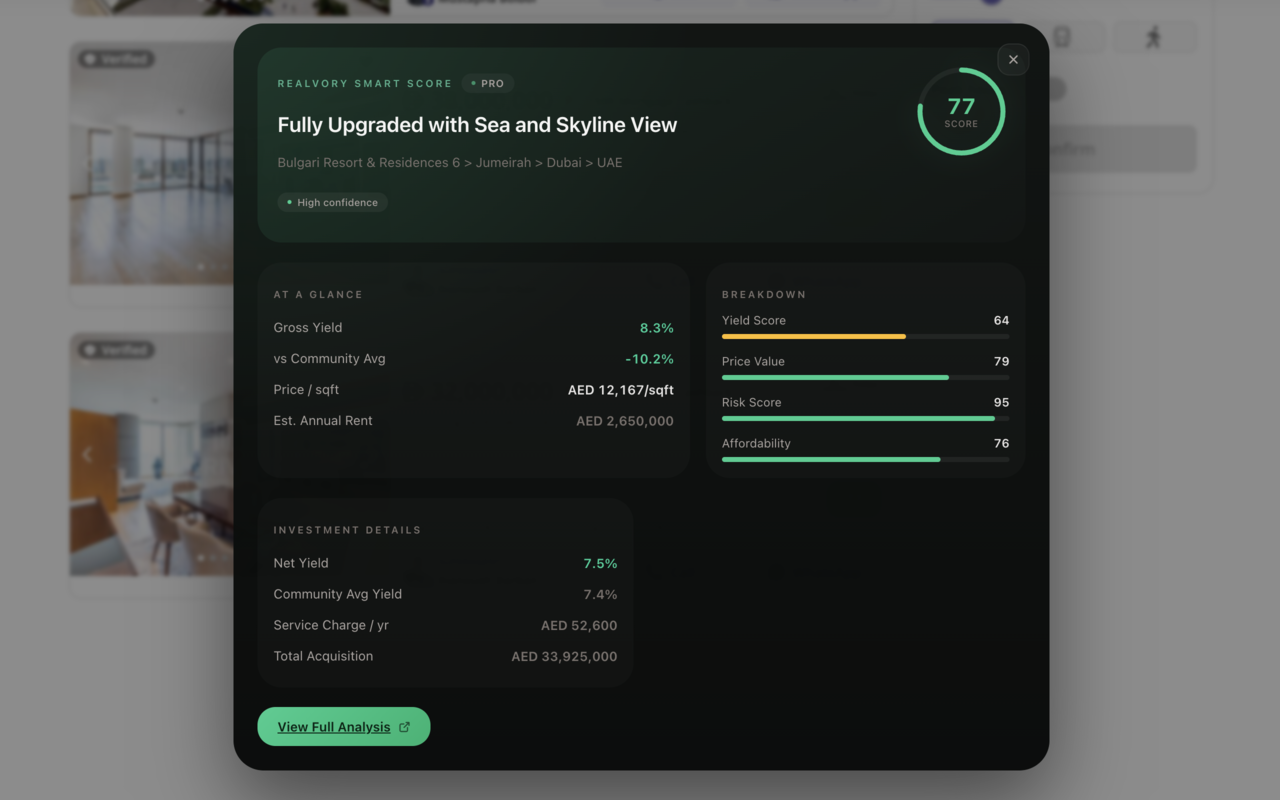

Extension walkthrough
Watch how Realvory scores appear alongside Property Finder listings, helping you identify stronger candidates and open deeper investment analysis without interrupting your browsing flow.
Watch on YouTube